Best kids martial arts class management software in 2026

Best overall: MatPilot for an academy that needs attendance, billing and belt grading together. Best for timetable-only coordination: Google Calendar. Best for a manually maintained student register: Google Sheets. This 2026 guide compares kids martial arts class management software with lighter setups that cover only part of the job.
- MatPilot is the best fit for kids martial arts class management software with attendance, billing and per-art ranks.
- Google Calendar suits timetable coordination, not student billing or belt grading.
- Google Sheets suits manual student records; staff must maintain attendance and promotion evidence.
- Test guardian contacts, sibling billing and class moves before choosing any system.
Why this matters
A children's program has several records that must stay aligned. The student attends. A guardian handles communication and payment. The instructor records attendance and decides whether the student is ready to progress.
Do not treat a timetable as a complete student-management system. A calendar can show when karate starts without showing who attended, whose payment needs attention or which grading requirements remain incomplete.
Your buying decision should start with those handoffs. Ask the person at reception, the instructor and the person handling billing to demonstrate their work. A clean schedule is useful, but it does not resolve a disconnected student record.
What makes the best kids martial arts class management software
Use these criteria for your 2026 shortlist. They describe the work your school needs to complete, not a list of features to collect.
- Student and guardian records: Keep the child's training identity distinct from the adult responsible for communication and payment. Ask how guardian relationships are recorded and updated.
- Class scheduling: Show the weekly timetable clearly. Test a move between age groups, an instructor change and a cancellation before committing.
- Attendance history: Record participation against the correct student and class. Ask how staff correct an accidental check-in without losing the useful history.
- Discipline-specific progression: Keep BJJ, judo, karate and taekwondo ranks distinct. For boxing and Muay Thai, test the progression records your school actually uses rather than imposing belts.
- Billing follow-through: Trace a payment issue from identification to resolution. Test sibling arrangements explicitly; a billing feature alone does not prove your family setup works.
- Staff control: Identify who can change records, review suggested actions and approve communication. Automation should support the owner's decisions, not obscure them.
For a deeper timetable checklist, use the guide to martial arts class scheduling software. Scheduling deserves its own test because a recurring class and a student's enrollment are different records.
The options at a glance
These are different operating setups, not interchangeable products. Choose the row that matches the work you need to manage.
| Option | Best for | Standout capability | Key limitation |
|---|---|---|---|
| MatPilot | Managing the academy across attendance, billing and progression | Martial arts ranks alongside scheduling, Stripe billing and an approval-based co-pilot | Owners still review suggested actions; the Free plan has a 20-member limit |
| Google Calendar | Sharing a timetable when student administration is handled elsewhere | Recurring events and shared calendars | A class event is not a student ledger, payment record or grading record |
| Google Sheets | Maintaining a manual register with school-defined columns | Editable tables, formulas and filters | Staff must maintain the records and connect the workflow themselves |
No timetable or spreadsheet recommendation below should be read as a substitute for dedicated billing and membership management. The lighter options earn their place only when you deliberately keep their scope narrow.
1. MatPilot: best for running the academy, not just the timetable
MatPilot provides martial arts gym management across members, classes, billing and belt grading. Its stated features include attendance, per-art ranks, a Monday–Sunday timetable, Stripe billing, Xero sync and a co-pilot with approval gates. It is available through the web and native iOS and Android apps.
MatPilot is the best fit for kids martial arts class management software when the owner needs attendance, billing and per-art ranks in the same platform. That is a broader requirement than publishing the children's class schedule.
What to examine in the demo
Start with an actual administrative path. Find a student, check the class timetable, record attendance and inspect the student's rank. Then review how a payment issue becomes an action the owner approves.
The timetable covers 7 days, Monday through Sunday. Use that coverage to test your weekday children's classes and weekend sessions, rather than judging only the appearance of the calendar.
Availability covers 2 markets: the United States and Ireland. Keep your demo tied to the market where the academy operates, especially when reviewing payment and accounting setup.
Product strengths
- Members, classes, attendance, billing and grading fall within the platform's stated scope.
- Per-art ranks support a school that teaches more than one ranked discipline.
- Stripe billing and Xero sync connect payment and accounting work.
- The co-pilot covers at-risk members, trial follow-ups, promotion readiness and payment issues, with owner approval.
Product constraints
- Approval gates leave a decision-making task with the owner. Do not expect the co-pilot to remove accountability.
- The Free plan is limited to 20 members. Count the records your academy needs before selecting a plan.
- A general billing capability does not establish your exact guardian or sibling arrangement. Demonstrate that workflow before moving records.
Best for: Owners who want class operations, membership administration and martial arts progression handled within the same platform.
Verdict: Buy if the guardian and family-billing demonstration matches your school's actual process.
2. Google Calendar: best for timetable-only coordination
Google Calendar supports events, recurring schedules and shared calendars. Those functions make it a practical option for showing instructors when classes take place.
Its role should stay narrow. A recurring children's judo event tells staff when to teach; it does not provide a complete record of the children enrolled, their payments or their progression.
Where it fits
Use a shared timetable when your existing membership system already handles student records. Separate calendars can help you organize different schedules, but the important decision is which timetable staff treat as authoritative.
For your 2026 review, change an upcoming class and check the result with another staff member. Confirm the correct session changed and that nobody is working from an outdated copy elsewhere.
Google Calendar pros
- Recurring events suit a repeating weekly timetable.
- Shared calendars let staff consult the same schedule.
- Event details provide space for practical class information.
Google Calendar cons
- Calendar events are not individual student attendance records.
- Calendar events do not replace payment reconciliation or promotion evidence.
- Keeping enrollment in another system creates a handoff staff must manage.
Avoid putting detailed children's records into event descriptions simply because the field is available. Keep the timetable focused on the session and maintain personal records in the system designated for that purpose.
Best for: A school with student administration already covered that needs a shared staff timetable.
Verdict: Buy into this setup for scheduling only; skip it as your complete academy-management system.
3. Google Sheets: best for a manually maintained student register
Google Sheets provides editable tables, formulas and filters. You can use those functions to build a register around the information your school chooses to maintain.
The distinction is responsibility. A spreadsheet gives you a place to record work; it does not define or carry out the academy's operational process for you.
Where it fits
A manual register works best when someone owns its upkeep. Give the sheet clear column definitions and decide who updates attendance, contact details and progression records.
Use a stable student identifier rather than relying on names alone. Keep discipline and rank in separate fields when your school teaches multiple arts, and define what an empty field means. Otherwise, staff cannot tell whether information is missing or not applicable.
Google Sheets pros
- School-defined columns let you match the register to your terminology.
- Filters help staff inspect records by class or discipline.
- Formulas support calculations from the information entered.
Google Sheets cons
- Attendance and progression information require deliberate entry and checking.
- Incorrect formulas or inconsistent entries can affect the register.
- A sheet does not, by itself, execute a membership billing or payment-recovery workflow.
Keep the spreadsheet's role explicit. If it is a migration checklist, do not quietly let it become the permanent billing record. If it is the attendance register, name the person responsible for corrections.
Best for: A school that deliberately accepts manual recordkeeping and can assign responsibility for updates.
Verdict: Hold as a limited register or transition tool; skip it when you need connected billing and class administration.
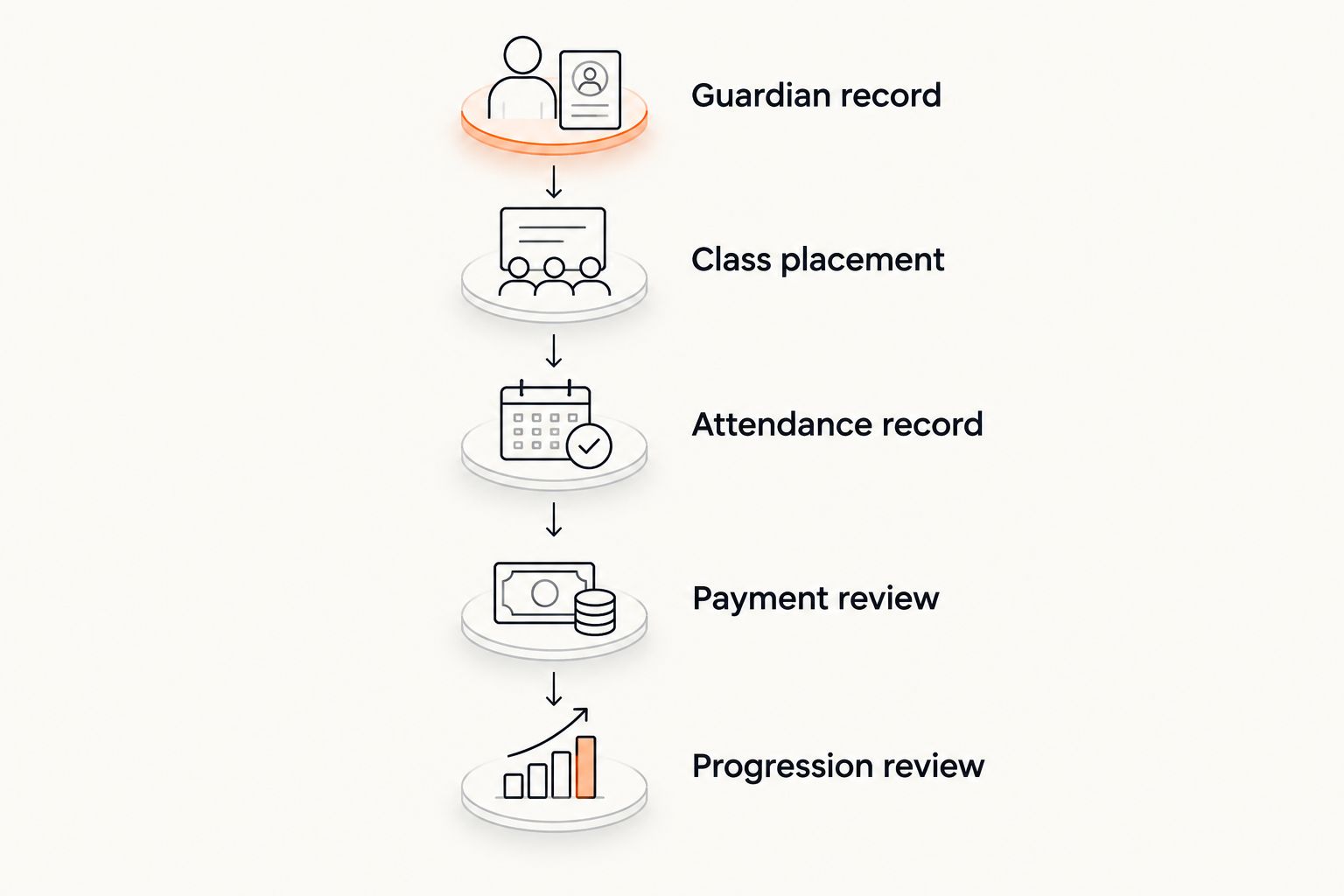
Test the student journey before choosing
Use the same student journey for every 2026 demonstration. Bring a fictional record rather than exposing a real child's information in an unfamiliar system.
The following test is a buying checklist, not a claim that every option supports every step. A timetable-only tool should fail the billing test; that failure tells you where another system remains necessary.
Guardian record
Create the student and identify the adult responsible for communication. Ask how staff update that relationship and how they distinguish training information from billing responsibility.
Then test a sibling arrangement. Find out whether staff can understand the household without merging the children's attendance or progression histories.
Class placement
Place the student in the intended class. Move the student to another group and inspect the resulting timetable and enrollment records.
Ask what happens when the class is canceled. The demonstration should show the operational result, not just a changed calendar entry.
Attendance record
Record attendance and correct a mistake. Check that the instructor can find the student's history without searching through unrelated classes.
For a mixed academy, repeat the attendance check in a striking class. Boxing and Muay Thai administration deserve the same attention as BJJ, judo or karate.
Payment review
Inspect a payment issue and identify the next action. Ask who sees the issue, who contacts the responsible adult and how staff know the matter is resolved.
If accounting integration matters to your school, follow the payment into the accounting workflow. Do not stop at the presence of an integration name.
Progression review
Inspect the student's discipline-specific record. Ask the instructor to explain what supports the next promotion or progression decision.
Attendance and readiness are different questions. A student can attend consistently while still needing work on the syllabus; the record should support the instructor's judgment rather than replace it.
How the options were ranked
This 2026 ranking uses operational coverage, not an invented test score. The criteria are student records, scheduling, attendance, discipline-specific progression, billing follow-through and staff control.
Dedicated martial arts management ranks first for the full academy workflow. A shared calendar ranks as a timetable option. A spreadsheet ranks as a manual register. Neither lighter setup earns credit for billing or grading automation that has not been established.
The ranking does not make claims about current Gymdesk, Kicksite, Mindbody or Zen Planner features, terms or fees. A comparison with those vendors requires current primary-source evidence and a demonstration of the same student journey.
Which setup should you choose?
Choose MatPilot first when your requirement spans attendance, billing and martial arts progression. Test guardian relationships and sibling billing before committing, because those details determine whether the system fits a children's program.
Choose Google Calendar when the timetable is the only unresolved problem. Choose Google Sheets when you intentionally want a manual register and have assigned someone to maintain it.
For a 2026 switch, separate the purchase decision from the migration decision. Buying a suitable system does not mean every old record is ready to import. Review student identities, guardian relationships, attendance history, balances and ranks before replacing the current source of truth.
Keep the existing system authoritative until you have checked the replacement records. Parallel systems without a clear owner create uncertainty about which entry staff should trust.
FAQ
What's the best kids martial arts class management software?
MatPilot is the best fit in this guide for an academy that needs attendance, billing and per-art ranks together. Test guardian relationships and sibling billing before choosing it for a children's program.
Can I manage children's martial arts classes with Google Calendar?
Google Calendar can manage a shared class timetable, but it is not a complete student-management system. Keep attendance, billing and progression in records designed for those tasks.
Can Google Sheets track children's attendance and belts?
Google Sheets can hold manually entered attendance and rank records. Staff must define the columns, enter updates and check the information; the spreadsheet does not perform the school's workflow by itself.
What should I check for sibling and family billing?
Check who is responsible for payment and how each child's records remain separate. Demonstrate a sibling arrangement and a payment issue rather than assuming a general billing feature covers your process.
Does attendance alone prove a child is ready for grading?
No. Attendance records participation, while promotion readiness depends on the instructor's requirements and assessment. Review syllabus progress alongside attendance.
Is this software relevant to boxing and Muay Thai classes?
Yes, scheduling, attendance, student records and billing matter for children's boxing and Muay Thai classes too. Use the progression process your school teaches instead of forcing a belt structure onto every discipline.
What should I check before switching from Gymdesk or Kicksite?
Check the current export options and map student, guardian, attendance, payment and rank records to the replacement system. Confirm those details with both vendors before ending the existing arrangement.
One last thing
Before the demo ends, ask an instructor to distinguish two students with the same first name. Then ask the billing administrator to find the adult responsible for each account.
That small exercise checks whether staff can identify the right person across teaching and administration. A timetable can look correct while the underlying relationships are still unclear.