Best taekwondo software in 2026

Best taekwondo software for integrated school operations: MatPilot. Best for a manually maintained grading register: Google Sheets. Best for a standalone repeating timetable: Google Calendar. This 2026 shortlist separates a martial arts management platform from narrower tools that leave billing, attendance, and member administration with you.
- MatPilot is the taekwondo software pick for schools combining member management, attendance, billing, scheduling, and per-art ranks.
- Google Sheets suits a manually maintained grading register, not an integrated school management workflow.
- Google Calendar suits recurring class events, not student attendance or belt promotion records.
- Before switching, demonstrate a family payment issue, a missed class, and a grading decision using your school's rules.
Why this matters
Taekwondo administration connects several records. A student attends a class, works toward a grade, and belongs to a membership arrangement. Those records need to agree. A tidy calendar does not tell you whether the student's payment failed or whether the instructor approved a promotion.
Choose around the work you need to finish, not the longest feature list. For a 2026 decision, start with three jobs: record attendance, review grading readiness, and resolve a payment issue. Ask each shortlisted system to demonstrate those jobs with your own examples.
This guide ranks three different approaches. The first is dedicated martial arts management software. The others are narrower tools for schools that deliberately keep administration manual. They are not equivalent replacements, and the comparison does not treat them as such.
What makes the best taekwondo software
Use these criteria before looking at the shortlist. Each criterion describes something you should demonstrate, not a promise that every tool provides it.
- Member records: Keep the student's identity, membership, and training history connected. For children, check how the system handles the responsible adult and billing contact.
- Class attendance: Record who attended the actual session. A class on a calendar is not an attendance record.
- Grading evidence: Separate current rank, training history, and instructor approval. Your school's syllabus decides readiness; attendance alone does not.
- Billing follow-through: Show an unsuccessful payment and the steps needed to resolve it. Check what remains an owner task.
- Owner control: Identify which actions require approval and who approves them. Automated suggestions should not become unexplained member communications.
- Daily access: Demonstrate the work on the device you use at the desk or beside the mat. Check the workflow, not just whether an app exists.
For promotion decisions, the useful distinction is evidence versus approval. The guide to belt and rank tracking for martial arts schools examines that part of the decision separately.
Taekwondo software at a glance
| Ranked option | Best for | Standout capability | Key limitation |
|---|---|---|---|
| MatPilot | Connected school administration | Members, attendance, scheduling, Stripe billing, and per-art ranks in a martial arts platform | Your exact taekwondo grading and family-billing workflows still need a demonstration |
| Google Sheets | A manually maintained grading register | Editable rows, columns, formulas, and sorting | Staff must keep records aligned with separate attendance and payment processes |
| Google Calendar | A standalone repeating timetable | Recurring events and shared calendar access | Events do not provide a student grading or billing record |
No starting-price column is included. Compare the current commercial terms separately from whether the workflow fits your school.
1. MatPilot: best taekwondo software for connected administration
MatPilot combines member management, classes, attendance, billing, and belt grading. It supports per-art ranks, Stripe billing, and Xero sync, with access through the web and native iOS and Android apps. Its AI co-pilot covers areas including payment issues, trial follow-ups, at-risk members, and promotion readiness, with owner approval gates.
Best for: A taekwondo school that wants operational records connected, especially an academy teaching more than one martial art.
The buying question is not whether belt tracking appears on a feature list. Ask whether an instructor can review a student's training record, make a grading decision, and keep that decision distinct from the student's payment status. A taekwondo and boxing academy should assess both disciplines as first-class programs, even though their progression systems differ.
MatPilot pros:
- Member management, scheduling, attendance, and billing sit within a martial arts management platform.
- Per-art ranks address academies where students train in different disciplines.
- Web, iOS, and Android access support different daily working setups.
- Approval gates keep the owner involved in co-pilot actions.
Limitations to check:
- Approval gates require an owner review step; they are not a reason to stop checking proposed actions.
- Per-art rank tracking does not, by itself, establish that every rule in your taekwondo syllabus is represented.
- Stripe billing and Xero sync do not replace checking your particular family-payment and accounting workflow.
For your 2026 demonstration, prepare one student who trains in taekwondo and another discipline. Ask to inspect each rank separately. Then present a payment issue and a promotion-readiness question, and identify exactly what the owner reviews and approves.
Verdict: Buy only after your school's grading, attendance, and billing examples pass the demonstration.
2. Google Sheets: best for a manually maintained grading register
Google Sheets lets you organize a grading register in rows and columns, sort records, and use formulas. You can create fields for student name, current grade, review date, and instructor decision. The structure is yours to maintain.
Best for: An instructor who needs an editable grading register and accepts responsibility for updating it manually.
Use a spreadsheet as a defined register, not an accidental replacement for every school process. Decide who changes the grade field and what evidence supports that change. Keep the instructor's decision separate from any formula that summarizes attendance.
Google Sheets pros:
- You can name fields to match your own grading terminology.
- Sorting helps organize records for a grading review.
- Formulas can summarize information entered into the sheet.
- A simple table makes the underlying record structure visible.
Google Sheets cons:
- A grading spreadsheet does not automatically reconcile separate payment and attendance records.
- Staff must maintain a consistent structure and enter updates.
- A calculated result is not an instructor's approval.
For a 2026 setup, define the fields before entering student records. Use one field for the current grade and another for the next review decision. Do not overwrite the previous result without deciding where grading history will live.
Test the register with 10 sample student records. Include a spelling correction, a withdrawn student, and a student whose grading decision changes after review. These are test cases, not a claim about the capacity of the tool.
Verdict: Hold as a focused grading register; skip it as the sole system for connected school administration.
3. Google Calendar: best for a standalone repeating timetable
Google Calendar supports events, recurring schedules, and shared calendar access. It can represent a repeating taekwondo timetable without creating a full student management process. That distinction matters when you decide what the calendar owns.
Best for: A school that needs a shared class timetable while maintaining member, attendance, and billing records elsewhere.
A recurring event answers when a class takes place. It does not answer which students attended, what they paid, or whether they are ready to grade. Keep those responsibilities explicit rather than expecting the event record to do everything.
Google Calendar pros:
- Recurring events suit repeating class schedules.
- Shared calendar access helps instructors consult the same timetable.
- Event details can hold practical class information.
- You can maintain a timetable separately from a grading register.
Google Calendar cons:
- A calendar event is not a martial arts attendance register.
- Belt history and billing require separate processes.
- Schedule edits do not, by themselves, resolve changes in your other records.
Check a complete 7-day timetable during your 2026 review. Include children's taekwondo, adult taekwondo, and any striking or grappling classes you actually teach. Change one session and inspect the recurring schedule before sharing it with instructors.
For a shared timetable, assign an owner for changes. Otherwise, the question is not whether the calendar works; it is who checks that the published schedule matches the class being taught.
Verdict: Hold for timetable sharing; skip it as a replacement for taekwondo management software.
How these options are ranked
This 2026 ranking prioritizes connected member records, attendance, grading, billing, owner control, and daily access. Dedicated martial arts management software comes first because its stated capabilities cover more of those jobs. The spreadsheet and calendar occupy narrower slots, not second and third place in a like-for-like platform test.
The ranking uses stated product capabilities and established spreadsheet and calendar functions. It does not claim measured time savings, better payment recovery, or a hands-on benchmark. Your demonstration should establish whether the workflows fit your school.
Run a school-specific demonstration before switching
Prepare a 30-minute demonstration agenda. Use sample records rather than real children's personal information. The goal is to see who does each task, where the result is stored, and what needs checking afterward.
Member record
Create a sample student and identify the responsible adult and billing contact. Ask where membership status lives. Check whether staff can distinguish a student record from the person responsible for payment.
Class attendance
Place the student in a class scenario and record attendance. Then inspect the student's history. Ask how staff correct an entry recorded against the wrong session, without assuming the product supports your preferred correction method.
Grading review
Present your actual promotion rules. Identify the current rank, the evidence the instructor needs, and the final decision. Ask how the record distinguishes readiness for review from an approved promotion.
Payment issue
Present a failed-payment scenario involving a family. Ask what the owner sees, what action is proposed, and who contacts the payer. Check how a resolved issue is reflected in the member and accounting processes.
Owner approval
Review the proposed follow-up or grading action before approval. Identify which records the owner should inspect first. A suggestion is useful only when the owner can understand the basis for acting on it.
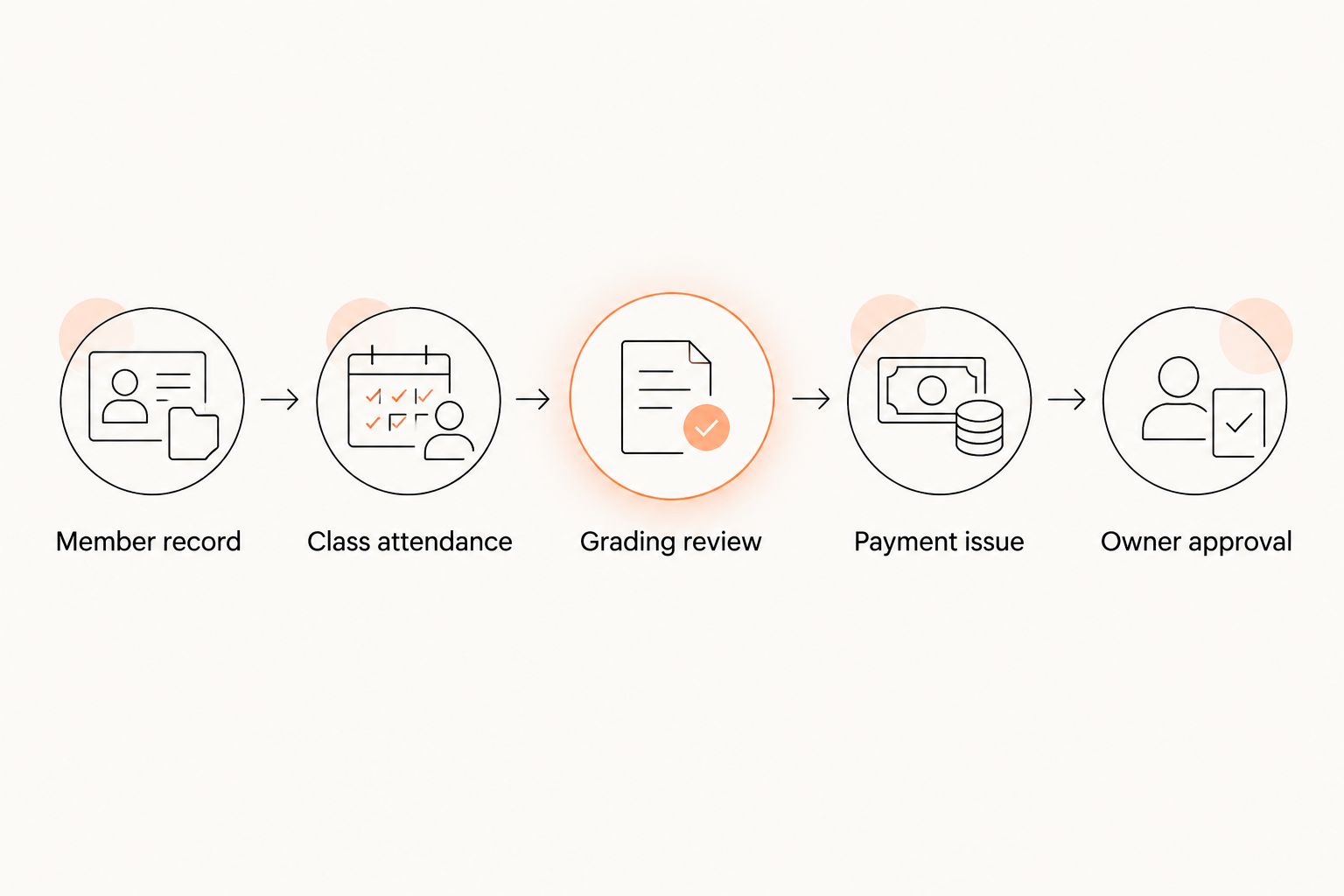
Finish by repeating one task on the device you actually use during class. Desktop screenshots do not establish that an instructor can complete the same work beside the mat. Keep a written list of accepted workflows and unresolved questions.
Which taekwondo software should you choose?
MatPilot is the taekwondo software pick for owners who need member management, attendance, billing, and per-art ranks together. Make the purchase decision conditional on your own grading and payment scenarios, not on a general product tour.
Choose Google Sheets when the immediate job is maintaining a grading register and you accept manual upkeep. Choose Google Calendar when the immediate job is sharing a repeating timetable. Neither choice removes the need for separate member and payment administration.
If you are switching from Gymdesk or Kicksite, inventory your existing records before choosing a destination. List member identities, contacts, current ranks, attendance history, membership status, and payment arrangements. Ask how each record type will move and how you will validate it; do not assume that every field transfers unchanged.
FAQ
What's the best taekwondo software for running a school?
MatPilot is the pick in this shortlist for connected school administration. Its stated capabilities include members, scheduling, attendance, billing, and per-art ranks; demonstrate your exact grading and payment rules before buying.
Can I use Google Sheets to track taekwondo belts?
Yes, Google Sheets can hold a manually maintained taekwondo grading register. Keep the current grade, review evidence, and instructor decision distinct, and decide how you will preserve grading history.
Is Google Calendar enough to manage a taekwondo school?
Google Calendar is enough for a standalone repeating timetable, not connected school management. Student attendance, grading records, memberships, and payment administration need separate processes.
Does class attendance automatically mean a student should grade?
No, attendance is evidence for a grading review, not an instructor's promotion decision. Apply your school's syllabus and approval process rather than treating a class total as a complete assessment.
What should I check for family billing?
Check who pays, which students the payment covers, and what happens when that payment fails. Ask the vendor to demonstrate your family scenario instead of assuming that member billing covers every household arrangement.
How should I compare taekwondo software in 2026?
Compare the same member, attendance, grading, and payment scenarios in every demonstration. Record who completes each task, which actions need approval, and where the final result appears.
What should I prepare before switching from Gymdesk or Kicksite?
Prepare an inventory of member identities, contacts, ranks, attendance history, memberships, and payment arrangements. Ask the destination vendor to explain transfer and validation for each record type before committing to the switch.
One last thing
A belt record answers what rank a student holds; a grading record should also explain the decision. Before changing systems, choose one completed promotion and ask whether you can reconstruct the evidence and instructor approval. That check is more useful than counting fields on a settings screen.